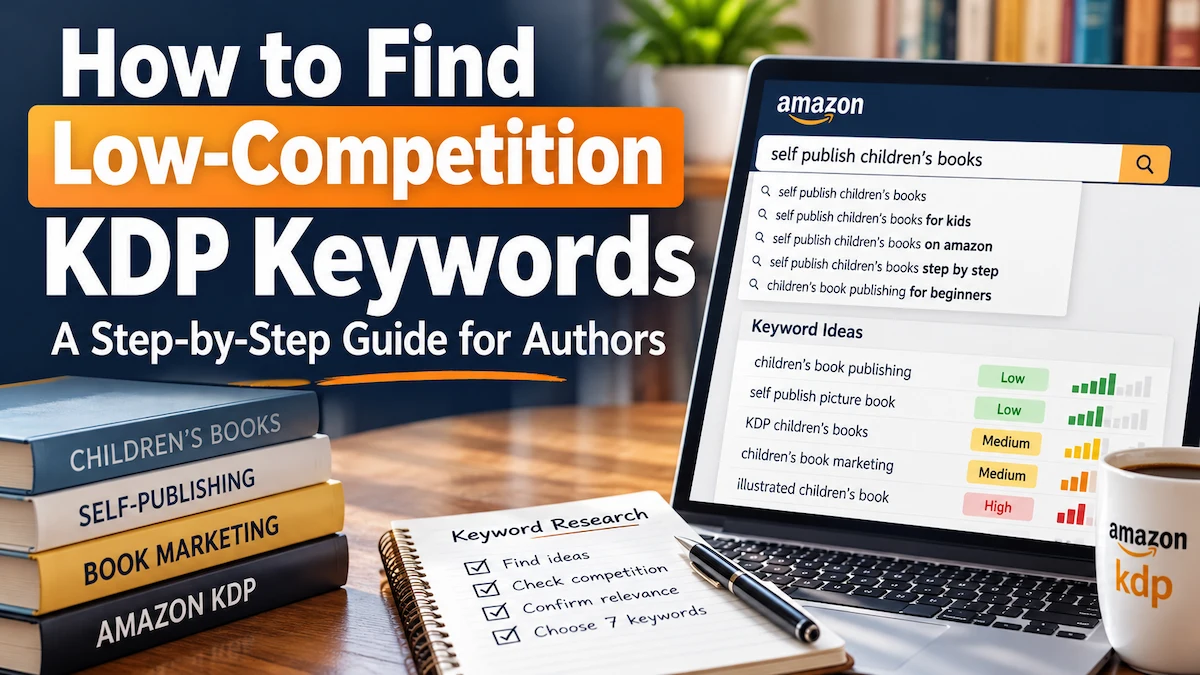
How to Find Low-Competition KDP Keywords: A Step-by-Step Guide for Authors

Introduction
Publishing a book on Amazon does not automatically mean readers will find it.
Thousands of books may compete for attention in the same broad subject or genre, and one of the ways Amazon decides which books are relevant to a shopper’s search is through metadata, including keywords.
The problem is that many authors choose their KDP keywords by guessing.
They enter broad terms such as “romance,” “business,” “self-help,” or “children’s book” without checking how competitive those searches are or whether readers actually use more specific phrases.
A better approach is to look for low-competition KDP keywords: relevant search terms that potential readers may use but where your book has a more realistic opportunity to appear among the competing results.
This guide explains how to research those keywords manually on Amazon and how a keyword research tool such as Publisher Rocket can make the process faster and more data-driven.
What Are Amazon KDP Keywords?
When you publish through Amazon Kindle Direct Publishing, KDP allows you to enter up to seven keywords or short keyword phrases for your book.
These keywords help Amazon understand what your book is about and which customer searches may be relevant to it.
Amazon recommends choosing words that accurately describe your book and reflect the language readers are likely to use when searching.
For example, a broad term such as:
parenting
may describe a book accurately, but it is extremely general.
A more focused search phrase might be:
parenting anxious teenagers
or:
positive discipline for toddlers
depending on the actual content of the book.
The objective is not simply to find the most popular keyword. You want to find keywords that are:
- highly relevant to your book,
- specific enough to match reader intent,
- searched by potential buyers,
- and not dominated by competition your book has little chance of outranking.
Amazon’s official KDP keyword guidance recommends thinking like a reader, examining Amazon’s search suggestions, and checking the results produced by keywords you are considering.
What Does “Low Competition” Mean for KDP Keywords?
A low-competition keyword is not necessarily a phrase with almost no competing books.
If nobody searches for the phrase, having little competition is not particularly useful.
The goal is to find a balance between demand, relevance, and competition.
Think of keyword research this way:
Useful keyword opportunity = reader demand + strong relevance + manageable competition
A keyword with high demand but overwhelming competition may be difficult for a new book to rank for.
A keyword with almost no competition but no meaningful reader demand may bring little traffic.
The strongest opportunities often sit somewhere between those two extremes.
This is why long-tail keywords can be useful. They are more specific than broad one- or two-word searches and often reveal clearer buying intent.
For example:
Broad: decluttering
More specific: decluttering for seniors
More specific still: helping elderly parents declutter
The narrower phrase may receive fewer searches than the broad keyword, but the people using it may be much closer to the intended audience for a relevant book.
Step 1: Start With the Reader, Not a Keyword Tool
Before opening any keyword research software, define the person most likely to buy your book.
Ask:
- Who is this book written for?
- What problem are they trying to solve?
- What result do they want?
- What words would they naturally type into Amazon?
- Would they search by topic, audience, problem, genre, setting, or desired outcome?
Suppose you have written a nonfiction guide for first-time authors who want to publish children’s books.
Possible starting ideas might include:
- self publish children’s book,
- children’s book publishing,
- publish picture book,
- children’s book formatting,
- Amazon KDP children’s books.
These are seed keywords. You are not committing to them yet. They simply give you starting points for research.
Step 2: Use Amazon Search Suggestions
Go to Amazon and begin typing one of your seed phrases into the search box.
Do not immediately press Enter.
Watch the autocomplete suggestions Amazon displays.
Those suggestions can reveal longer searches related to your starting phrase.
Amazon itself recommends examining the suggestions that appear while researching potential KDP keywords.
For example, if you begin with a broad idea and Amazon suggests more specific variations, record the ones that accurately fit your book.
Do not copy every suggestion.
The keyword must still describe the book honestly.
A phrase may look attractive from a marketing perspective, but if readers searching for it would be disappointed by your book, it is not a good keyword.
Step 3: Search the Keyword and Study the Results
Now search Amazon using the phrase you are considering.
Look closely at the books appearing on the first page.
Ask:
- Are the results actually about the same subject as my book?
- Are most of the competing books from famous authors or major publishers?
- How many reviews do the leading books have?
- Are the books professionally packaged?
- Are there newer or independently published books appearing prominently?
- Does the search appear dominated by a few extremely established titles?
You are trying to answer two different questions.
First:
Is this keyword relevant?
Second:
Can my book realistically compete here?
A search result filled with highly established books carrying thousands of reviews may be difficult for a new title.
On the other hand, if the first page includes relevant independent books with more modest review counts and varied sales rankings, the keyword may deserve closer investigation.
Do not reduce competition research to the total number of search results. The strength of the books occupying the most visible positions matters much more.
Step 4: Look for Evidence of Reader Demand
Competition alone is not enough.
You also want evidence that readers are interested in the topic.
Useful signals include:
- Amazon autocomplete suggestions,
- multiple relevant books appearing for the search,
- books with meaningful review activity,
- competitive Best Sellers Ranks,
- and several titles apparently generating sales within the niche.
None of those signals gives you a perfect monthly search count.
Amazon does not provide authors with a simple public list showing the exact number of times every book keyword is searched each month.
That means keyword research tools use estimates and marketplace data rather than direct guaranteed sales figures.
Treat those estimates as decision-support information, not promises.
Step 5: Narrow Broad Keywords Into Long-Tail Opportunities
If a broad keyword looks too competitive, make it more specific while keeping it natural.
Suppose your starting keyword is:
book marketing
You might investigate more focused ideas such as:
- book marketing for beginners,
- book marketing for self published authors,
- Amazon book marketing,
- launching a self published book.
The best keyword is not automatically the longest phrase.
It is the phrase that best connects:
what the reader wants + what your book actually provides + a realistic competitive opportunity.
You can repeat this process with several seed keywords until you build a shortlist.
Step 6: Use Publisher Rocket to Make the Research Faster
Manual Amazon research can work, particularly when you are publishing only occasionally.
The disadvantage is time.
You may need to test many phrases, open numerous book listings, compare competitors, examine rankings, and keep your findings organized manually.
Publisher Rocket is designed to make this research faster.
Affiliate disclosure: The Publisher Rocket links and promotional images in this section are affiliate links. If you purchase through them, AB Publisher LLC may earn a commission at no additional cost to you.

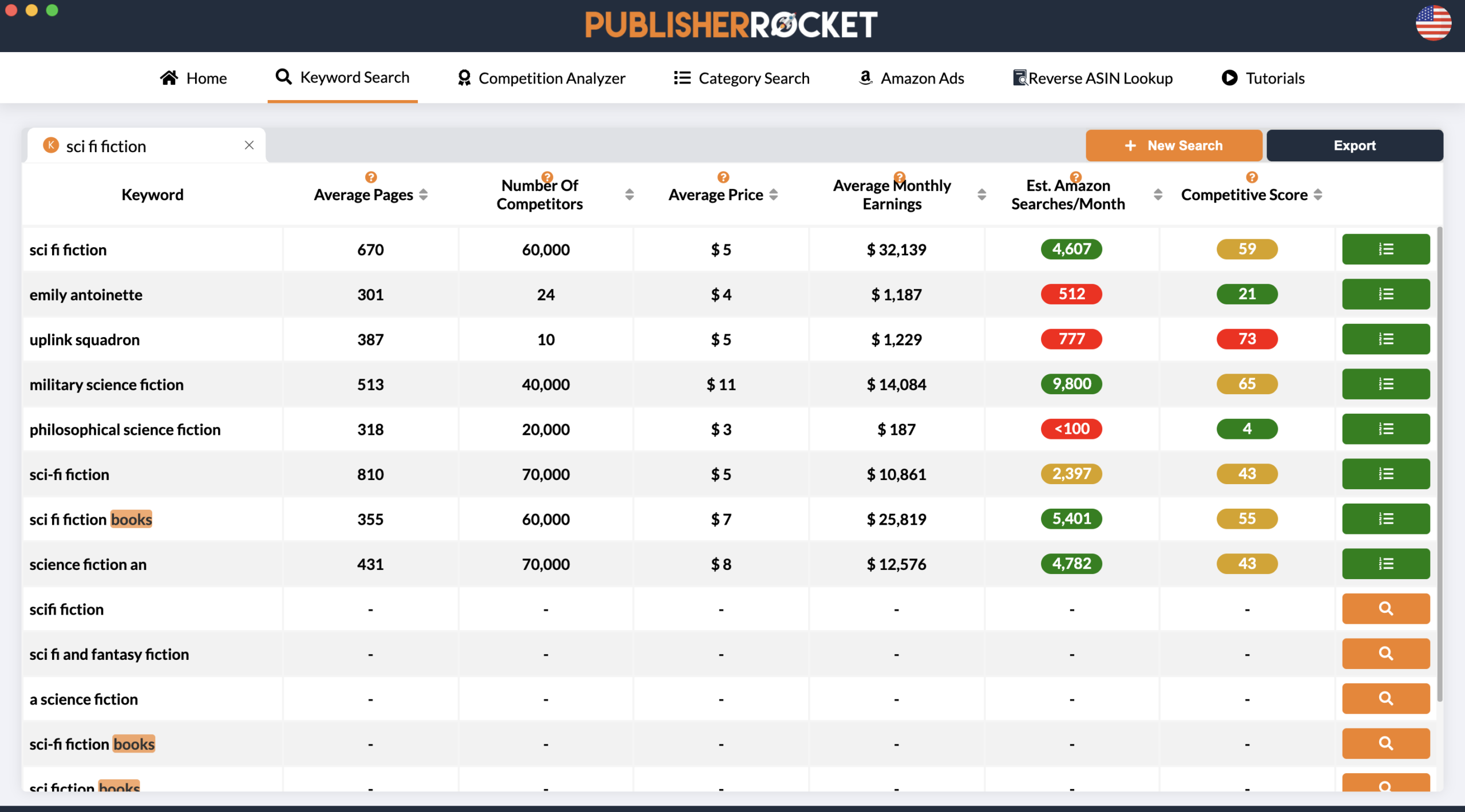
Its Keyword Search feature can provide data such as:
- keyword ideas,
- estimated searches per month,
- competitive scores,
- average monthly earnings estimates,
- and access to competing-book information.
Its Competition Analyzer can then help you examine the books competing for a particular search and compare information such as rankings, estimated performance, reviews, and other marketplace data.
Publisher Rocket also includes category research and other Amazon publishing research tools, so it can be useful beyond the seven KDP keyword fields.
The important point is that you should still use judgment.
A keyword should not be selected simply because one number looks attractive. Search estimates, competition scores, earnings estimates, and the actual books appearing in Amazon should be considered together.
Explore Publisher Rocket for KDP keyword and category research →
Manual KDP Keyword Research vs. Publisher Rocket
Both approaches can be useful.
| Feature | Manual Amazon Research | Publisher Rocket |
|---|---|---|
| Cost | Free | Paid software |
| Amazon autocomplete research | Yes | Keyword discovery tools available |
| Estimated monthly searches | Not directly available | Available as estimates |
| Competition analysis | Manual | Competition Analyzer |
| Competitor research | Open and compare books individually | Marketplace data organized inside the tool |
| Category research | Possible, but more time-consuming | Dedicated Category Search tools |
| Best for | Authors willing to spend more time researching manually | Authors who publish regularly or want faster data-driven research |
Publisher Rocket is therefore not a requirement for publishing successfully on KDP.
You can perform useful research manually.
Its main value is reducing the amount of manual work and bringing several useful Amazon research signals into one place.
Step 7: Choose Your Final Seven KDP Keywords
Once you have researched a larger list of possibilities, reduce it to the strongest seven choices.
Amazon allows up to seven keyword entries.
Its current metadata guidelines recommend using accurate words or phrases and suggest that keyword phrases of around two to three words can work well.
Do not fill your seven fields with nearly identical versions of the same idea.
For example, using:
- decluttering seniors,
- decluttering for seniors,
- senior decluttering,
- seniors declutter,
- declutter seniors,
would waste opportunities that could have been used to describe different relevant aspects of the book.
Instead, use your keyword fields to cover meaningful variations in reader intent.
Depending on the book, that might include its:
- main subject,
- target audience,
- problem being solved,
- desired outcome,
- setting,
- genre or subgenre,
- or a highly relevant use case.
Always keep the terms accurate.
KDP Keyword Mistakes to Avoid
Trying to manipulate Amazon’s search system can create metadata problems rather than better discoverability.
Amazon specifically warns authors against misleading or inappropriate keywords.
Avoid:
- names of unrelated authors,
- titles of books you do not own,
- claims such as “bestselling,”
- promotional terms such as “free,”
- unrelated popular keywords,
- unauthorized brand names,
- Amazon program names used as promotional keywords,
- HTML tags,
- and inaccurate terms added only because they appear popular.
Amazon also advises against wasting keyword space on information already adequately represented elsewhere in your metadata.
You can review the current rules in Amazon’s Metadata Guidelines for Books.
A Simple KDP Keyword Research Example
Imagine you have written a practical nonfiction book that teaches first-time authors how to publish a children’s picture book.
You begin with:
children’s book publishing
That phrase may be relevant, but you should not stop there.
You could create a research list containing ideas such as:
- publish children’s book,
- self publish picture book,
- children’s book publishing guide,
- KDP children’s books,
- picture book self publishing.
Next, type those ideas into Amazon and examine autocomplete suggestions.
Then search each promising phrase and inspect the first-page books.
Remove phrases that:
- produce mostly irrelevant results,
- do not accurately describe your book,
- appear to have almost no buyer activity,
- or are dominated by competitors your book is unlikely to challenge.
If you use Publisher Rocket, run the remaining phrases through its keyword research tools and compare estimated searches, competition, earnings signals, and the books ranking for each term.
You might begin with 20 or 30 ideas and eventually reduce the list to seven strong, distinct keywords.
That process is much more defensible than simply inventing seven phrases while uploading your book.
Can You Change KDP Keywords After Publishing?
Yes.
One useful feature of KDP is that your keyword decisions are not necessarily permanent.
Amazon allows publishers to edit the keywords for an existing title through the KDP Bookshelf and republish the updated book details.
That means you can revisit your keyword strategy if:
- your current terms are producing poor visibility,
- you identify stronger long-tail searches,
- reader behavior changes,
- your competitive environment changes,
- or you obtain better research data later.
Do not change keywords every few days based on small fluctuations.
Give your metadata time to work, monitor performance, and make deliberate changes when you have a clear reason.
Amazon provides instructions for updating existing keywords in its KDP keyword update guide.
Frequently Asked Questions
How many KDP keywords can I use?
Amazon KDP allows you to enter up to seven keywords or short keyword phrases for a book.
What makes a good KDP keyword?
A strong keyword accurately describes the book, reflects language potential readers may use, shows evidence of demand, and has competition your book can realistically challenge.
Should I use broad or long-tail KDP keywords?
A mixture may be appropriate, but highly specific long-tail phrases can sometimes provide better opportunities for newer books because the reader’s intent is clearer and competition may be lower.
Do not select a long-tail phrase merely because it is less competitive. It still needs meaningful relevance and demand.
How do I know whether a KDP keyword is too competitive?
Search the keyword on Amazon and study the books ranking prominently.
Look at the relevance of the results, strength of the authors and publishers, review counts, apparent sales performance, and whether newer or independent books are able to gain visibility.
Tools such as Publisher Rocket can add estimated competition and search data to that manual analysis.
Does Publisher Rocket show exact Amazon search volume?
Publisher Rocket provides estimated search data.
Treat those numbers as research estimates rather than exact guarantees from Amazon.
The best decision usually comes from combining several signals, including relevance, estimated demand, competitive strength, and what you observe directly on Amazon.
Do I need Publisher Rocket to find good KDP keywords?
No.
You can research keywords manually using Amazon search suggestions and competitor analysis.
Publisher Rocket is useful mainly because it speeds up the process and provides additional estimated data that would be difficult to gather manually.
Will Publisher Rocket guarantee that my book ranks or sells?
No.
No keyword tool can guarantee Amazon ranking or book sales.
Keywords are only one part of book discoverability. Cover design, title, description, reviews, pricing, reader demand, sales history, advertising, competition, and overall book quality can also affect performance.
Conclusion
Finding low-competition KDP keywords is not about discovering a secret phrase that guarantees sales.
It is about making better-informed metadata decisions.
Start with your reader. Develop several relevant seed keywords. Study Amazon’s search suggestions. Examine the books already ranking for those searches. Look for evidence of demand, and then compare the strength of the competition.
The strongest opportunities usually combine:
relevance + reader demand + realistic competition.
You can carry out that process manually, particularly if you publish only occasionally.
If you publish regularly or want a faster way to compare estimated searches, competition, competing books, and categories, Publisher Rocket can make the research considerably easier.
Research KDP keywords and categories with Publisher Rocket →
After improving your Amazon metadata, remember that discoverability and distribution are different parts of publishing. If wider print distribution is part of your strategy, read our guide to KDP Expanded Distribution vs. IngramSpark.
Need Help Preparing Your Book for Publication?
Keyword research is only one part of preparing a book for the market.
Authors also need to manage editing, formatting, cover design, metadata, publishing setup, and distribution so that the book is professionally presented when readers discover it.
AB Publisher LLC provides publishing support for authors preparing books for Amazon KDP and other publishing channels.
Need help preparing your book for publication? Visit our Services page to learn more about AB Publisher LLC’s publishing services, or Contact us to discuss your project.